
Finance & Payroll
Timesheets
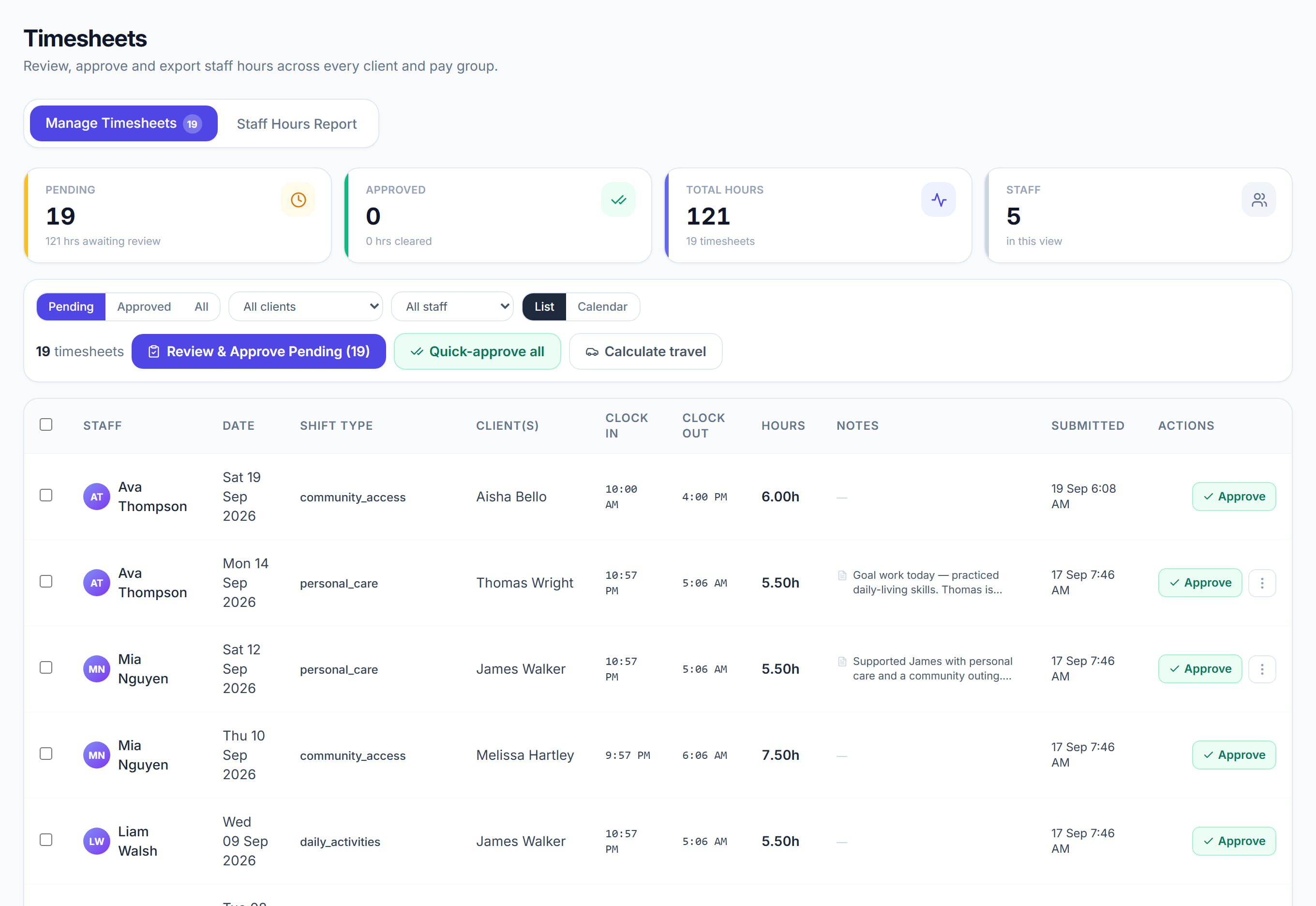
/timesheets10 stepsThe record of work actually done, and the gate every financial thing in Rostery passes through. Nothing counts as revenue, cost or pay until a timesheet here is approved.
Step by step
- 1
Pick the period with This week, or set your own range. The list shows Staff, Date, Shift Type, Client(s), Clock In, Clock Out, Hours and Submitted.

- 2
Compare Scheduled against Actual on each row. Where they differ the variance is highlighted — that is the column to read first, because it is where an unexpected cost comes from.
- 3
Correct anything wrong BEFORE approving: the actual times, Hrs, Mileage, Expense, Sleepover count, and whether a Co. car or Mod. veh. was used. Fixing after approval means unapproving, which unwinds the pay and the invoice with it.
- 4
Read the note attached to the shift with View full note. A shift with no progress note is a billing line with no evidence behind it, which is the first thing an auditor pulls on.
- 5
Approve the ones that are right. Approval is the single most consequential click in Rostery — it releases pay, invoicing and every financial report at once.

- 6
Use Quick-approve all only when you have actually reviewed the batch. It does exactly what it says, for everything pending on screen.

- 7
If something was approved in error, use the unapprove action to move it back to pending. Reset all to booked puts every row’s start and finish times back to the booked hours; the kilometres stay as recorded.
- 8
Check Est. Pay and the band columns — Weekday Hours, Sat, Sun, PH — before a pay run. They show how SCHADS penalties resolved, and a number that looks wrong here will look wrong on the payslip too.

- 9
Run the anomalies view before closing a period. It surfaces the timesheets that do not look like the others — very long shifts, missing clock-outs, duplicate entries.
- 10
Export with Download CSV, or Sync to Xero if your accounting integration is connected.
The screen
Did this answer your question?
If not, talk to us — we answer from Australia, in business hours.